Loyalty Card
The main information about loyalty card holders and corporate currency accounts is stored in the hrm_loyalty_card table and displayed in the employee profile in the Loyalty Card widget.
Roles required:
- portal users who have no special roles can view the balance of their own account only.
- users with the hrm_supervisor role can view the balance of their own account and the accounts of their subordinates.
- users with the hrm_agent role can view the balance of all employees.
To view the list of all cards in the agent interface, navigate to Human Resource Management → Loyalty Program → Loyalty Cards.
Loyalty Card widget
The information on individual accounts is available in the Loyalty Card widget. The widget is designed for a given loyalty program. This section describes a widget designed specifically for the loyalty program of the Grandbazar company.
Access the widget
To view the balance of your account on the portal, go to User menu → Profile. The Loyalty Card widget is located in the upper-right corner of the main working area.
If your role allows it, you can also view the balance of a subordinate's or colleague's account on the portal or in the agent interface. To do so, go to the profile of the required employee using the Organization Structure widget.
Widget layout
If the required employee is not registered in the loyalty program, the widget displays the following message:

If the required employee is registered in the loyalty program, the widget displays the following information:
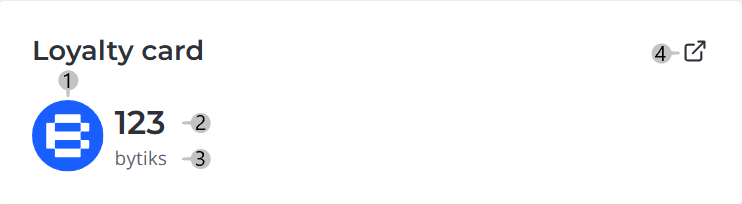
Legend:
- Corporate currency symbol;
- Account balance;
- Corporate currency name;
- Link to the loyalty program provider.