Users
The list of system users is used to store all detailed information about employees accounts and login settings required for the authentication. It registers data about SimpleOne users activity in the system.
The system automatically generates a record in the Users table when the system administrators add a new employee to the list.
Create a user
Role required: user_manager or admin.
To create a new user, follow the steps below:
- Navigate to User Administration → Users.
- Click New and fill in the fields.
- Click Save or Save and exit to apply the changes.
User form fields
| Field | Mandatory | Description |
|---|---|---|
| Login | Y | Specify a unique user login identifier. |
| First name | Y | Specify the user's first name. |
| Last name | Y | Specify the user's last name. |
| Password | N | Specify the user's password with further opportunity to change it if needed. See the Password resetting configuration article to set up the reset process you need. |
| Y | Specify the user's email address. This attribute value should be unique. | |
| Active | N | Select this checkbox to make the user active. The active state allows users to work with all the features of the SimpleOne system. |
| LDAP server | N | Specify the LDAP server used for storing the users accounts. |
| Source | N | The source address. The field is filled in automatically if the user is added from the AD. |
| Locked out | N | Select this checkbox to block this user. When the user is blocked, they have no access to the system. |
| Photo | N | Upload the user's photo. Click the clip icon and in the window that appeared, drag the files or load them from your device. |
| Timezone | Y | Specify a preferable timezone. Users can specify a preferable timezone later through the General Preferences menu. |
| Language | N | Specify a preferable language from the list. Users can specify a preferable language later through the General Preferences menu. |
| Date format | N | Specify a preferable date format for this user. Users can specify a preferable date format later through the General Preferences menu. |
Related Lists
- User Groups – all the groups that a user is assigned to.
- User Roles – all user's roles that are specified by the administrator.
- Subscriptions – all of this user's active and inactive subscriptions.
Configure login properties
There are two system properties in the system that allow to configure logins' creation:
- The simple.username.pattern property allows you to define symbols that can be used when creating a login.
- The simple.login.username.sensitivity.enabled property allows users to create similar logins with case-sensitivity.
To configure these properties, follow the steps below:
- Navigate to System Properties → All Properties.
- Find the necessary property using the list search boxes and open it.
- In the Value field:
- for simple.username.pattern specify all necessary symbols that will be available to create logins.
- for simple.login.username.sensitivity.enabled set true to allow users to create similar logins or false to forbid it.
- Click Save or Save and exit.
Assign a user role
A role granted to a user determines the level of access to the SimpleOne system features. Generally, a user inherits a role from the group assigned. Read the Roles article to learn more.
Role required: security_admin.
To assign a role to a user, follow the steps below:
- Open the user's record form.
- In the Related Lists area, select the Role tab and click Edit.
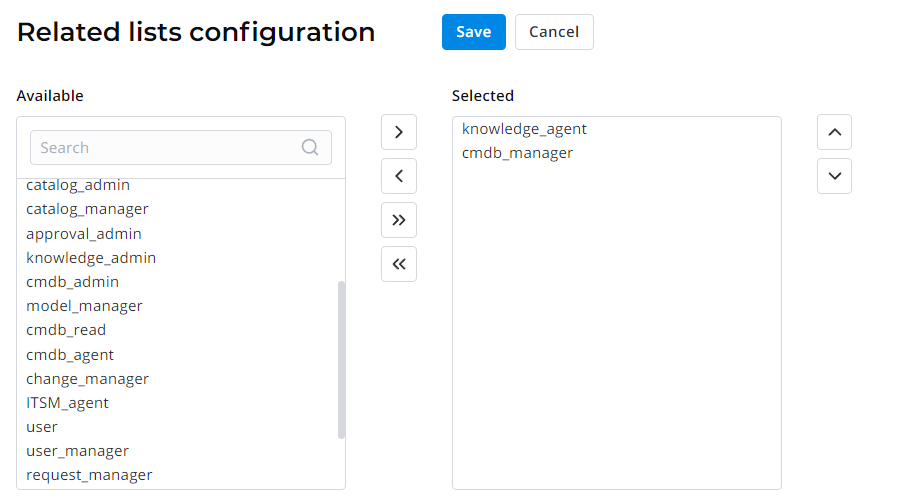
- In the heapselect form, move necessary roles from the Available box to Selected.
- Click Save or Save and exit to apply the changes.
System users
When the SimpleOne system is installed, the following system users are created:
- System User (system) – a user in whose name main system processes are executed. For example, processing system events, receiving incoming emails from a connected email account, parsing incoming email attachments, sending outgoing emails, and archiving system log records. The user has the admin and proxy_commenter roles.
- Admin User (admin) – a technical system administrator. The user has a full set of roles to configure the system: admin, security_admin, and impersonator.
- SimpleOne Service (service_user) – an account that allows SimpleOne company representatives access an instance. The user has the admin and security_admin roles.
- Guest User (guest) – a user intended to perform actions that do not require authorization. For example, these may include activities on public portals or Scripted REST API actions that do not require authentication. The guest user has no roles.
The system user accounts created in the User (user) table, are technical and are not intended for authorization of employees. To give your employees access to the instance, create records in the Employees (employee) table.